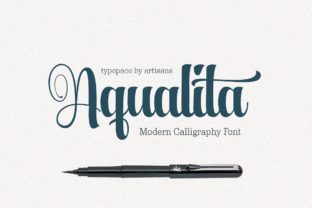
Aqualita: A Handwritten Font for Editorial Charm
There’s a moment in the design process when everything clicks. It happens while tweaking a blog header, finalizing a newsletter layout, or choosing a font that feels just right for a project. For many, that moment comes with Aqualita—a soft, handwritten script font that brings warmth and personality to any editorial space.
The Personality of Aqualita
Aqualita has a quiet charm that feels both authentic and intentional. Its casual, slightly irregular strokes give it a handcrafted feel, as if someone had written it by hand with care. This makes it ideal for projects that aim to feel personal, approachable, and inviting. Whether used in a lifestyle blog, a recipe ebook, or a printable planner, Aqualita adds a touch of character without overwhelming the reader.
Real-World Applications
Imagine redesigning a lifestyle blog’s header. The goal is to create a visual identity that feels fresh yet familiar. Aqualita works beautifully here—its flowing lines and gentle curves can elevate a title, making it stand out while still maintaining readability. It’s also a great choice for pull quotes in an editorial feature, where a little flair can draw attention without distracting from the content.
In a recipe ebook, Aqualita can be used for chapter openers or section headings. Its friendly appearance pairs well with clean, modern typography, creating a balance between warmth and clarity. For a wedding guide, it adds a romantic, personal touch to headings and captions, reinforcing the theme of celebration and connection.
Readability and Visual Hierarchy
One of Aqualita’s strengths is its readability. While it’s a script font, it doesn’t sacrifice clarity. The spacing between letters is generous, and the overall structure remains legible even at smaller sizes. This makes it suitable for use in headers, subheaders, and decorative accents, but less ideal for long blocks of body text.
When designing for digital platforms, such as websites or newsletters, Aqualita performs well on screens, especially when paired with a complementary font. On mobile devices, its soft edges and consistent stroke weight help maintain legibility without appearing too ornate. In print, it adds a tactile quality that can enhance the reading experience, particularly in guides, worksheets, and branded materials.
Pairing Aqualita with Other Fonts
To maximize Aqualita’s versatility, consider pairing it with other fonts that complement its style. A serif font like Georgia or Playfair Display can provide a strong contrast for body copy, offering a classic and refined look. For a more modern feel, a sans serif like Lato or Open Sans works well in captions, navigation menus, or small text elements.
For editorial layouts, using Aqualita as a display font alongside a clean, readable typeface creates a balanced composition. This combination helps establish a clear visual hierarchy, guiding the reader through different sections of a publication while maintaining a cohesive aesthetic.
Considerations for Use
Aqualita excels in contexts that benefit from a humanized, expressive touch. It’s perfect for titles, headers, and decorative elements that require a sense of personality. However, it may not be the best choice for dense paragraphs, small captions, or formal documents where precision and neutrality are key.
Before incorporating Aqualita into a project, check the font’s available styles, alternates, and ligatures. These features can affect how the font looks in different contexts and ensure consistency across designs. Also, verify multilingual support and file formats to make sure it works seamlessly in ebooks, templates, or digital downloads.
Designing with Aqualita
For creators looking to build a brand identity, Aqualita can serve as a key element in logo design, social media graphics, or packaging. Its friendly, handwritten nature aligns well with brands that want to feel authentic and relatable. When used in a newsletter header or a course PDF, it adds a personal touch that resonates with readers.
Whether you’re working on a coaching workbook, a printable planner, or a digital magazine, Aqualita offers a flexible solution that enhances the visual appeal of your content. Its ability to adapt to different formats and styles makes it a valuable addition to any designer’s toolkit.