Biograph: A Script Font for Web Design
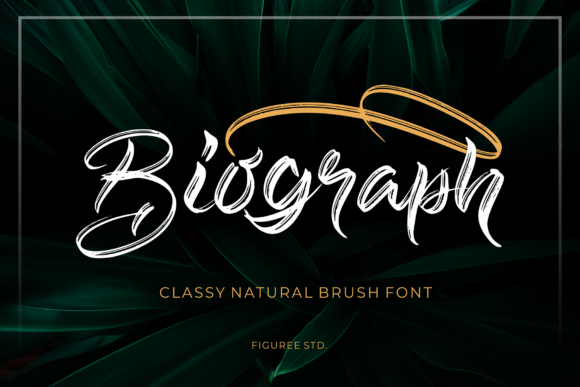
When working on a new website project, choosing the right font can feel like selecting the perfect piece of art to complement a space. I recently tested Biograph, a casual brush style script font from the Script Amp collection, and found it to be a versatile choice for adding a personal, adventurous touch to digital layouts.
Biograph has a handwritten quality that feels authentic and approachable. It’s not overly ornate, which makes it suitable for both modern and more traditional web designs. The strokes have a natural flow, giving it a sense of movement that can bring energy to a page without overwhelming the viewer.
Using Biograph in Real Web Projects
I first tried Biograph in a hero section of a boutique online store. The font added a warm, inviting tone that matched the brand’s aesthetic. It worked well as a headline over an image banner, drawing attention while still maintaining clarity. On mobile screens, the font remained legible, though I adjusted the size slightly for better readability on smaller devices.
For a coaching website, I used Biograph in a call-to-action button. The font’s fluidity made it stand out, but I paired it with a simple sans serif for the body text to ensure contrast and balance. This pairing helped maintain visual hierarchy, making the message clear without sacrificing style.
In a portfolio homepage, Biograph was ideal for the main title. It gave the site a personal, creative feel that aligned with the designer’s brand. I also experimented with using it for short phrases on landing pages, where its personality shone through without distracting from the content.
Readability and User Experience
One of the key considerations when using a script font is readability. Biograph performs well in short bursts, such as headlines or buttons, but I wouldn’t recommend using it for long paragraphs. For body copy, a more structured font like a serif or sans serif would be more effective.
On dark backgrounds, Biograph maintained good contrast, but I noticed that some characters were slightly harder to distinguish. For light backgrounds, the font looked clean and crisp. When placed over images or overlays, I kept the text size small and used a semi-transparent background to improve legibility.
For mobile users, I ensured that the font scaled appropriately and didn’t interfere with tap targets. Small buttons with Biograph required careful spacing to avoid accidental taps, but the font’s natural curves helped maintain a polished look.
Pairing Biograph with Other Fonts
Font pairing is essential for creating a cohesive design. I often pair Biograph with a clean, modern sans serif for body text. This combination allows the script font to shine as a decorative element while keeping the overall layout easy to read.
For editorial-style websites, I’ve paired Biograph with a serif font to create a more traditional, elegant feel. In other cases, I’ve used it alongside a bold, geometric sans serif to add contrast and visual interest. Each pairing highlights different aspects of Biograph’s personality.
When working on a digital brand kit, I included Biograph as part of the logo design. Its organic shape complemented the brand’s identity, and the font’s versatility allowed it to be used across various assets, from social media graphics to email templates.
Practical Considerations for Web Use
Before implementing Biograph on a website, it’s important to check the available styles, weights, and language support. The font includes multiple alternates, which can be useful for customizing the look of headings or logos. For web use, I made sure to download the correct webfont formats and verify the licensing terms.
Biograph is ideal for display purposes rather than body text. It works best in headers, CTA buttons, and short phrases where its character can be appreciated without compromising readability. For larger blocks of text, a more structured typeface is recommended.
As a web designer, I always test fonts in different contexts—responsive layouts, dark mode, and various screen sizes. Biograph held up well in most scenarios, but I made adjustments based on the specific needs of each project. Its flexibility makes it a valuable addition to any design toolkit.
Whether you’re building a product landing page, a course sales page, or a blog redesign, Biograph offers a unique way to express creativity. Its casual brush style brings a sense of authenticity that can elevate a website’s visual identity without being too flashy.
Overall, Biograph is a great choice for designers looking to add a personal, adventurous touch to their work. Its balance of style and usability makes it a reliable option for a wide range of web projects.